Quick Decode: How AWS EC2 Instance Names Work

Each EC2 instance type is a combination of letters and numbers that describe its function and hardware characteristics.
The structure typically includes: Family (use case) + Generation (version) + Attributes (processor or features) + Size (scale).
- m6i.large → m = general purpose, 6 = 6th generation, i = Intel architecture, large = medium-sized instance
- r6idn.2xlarge → r = memory optimized, 6 = 6th generation, i = Intel, d = local NVMe storage, n = enhanced networking, 2xlarge = twice the base size
透過理解這些代碼,新手就能像挑電腦規格一樣,依照用途快速找到合適的實例,避免多花冤枉錢,詳細及最新的規格可以參考 AWS 官方網站。
Instance Family: Defines the Use Case
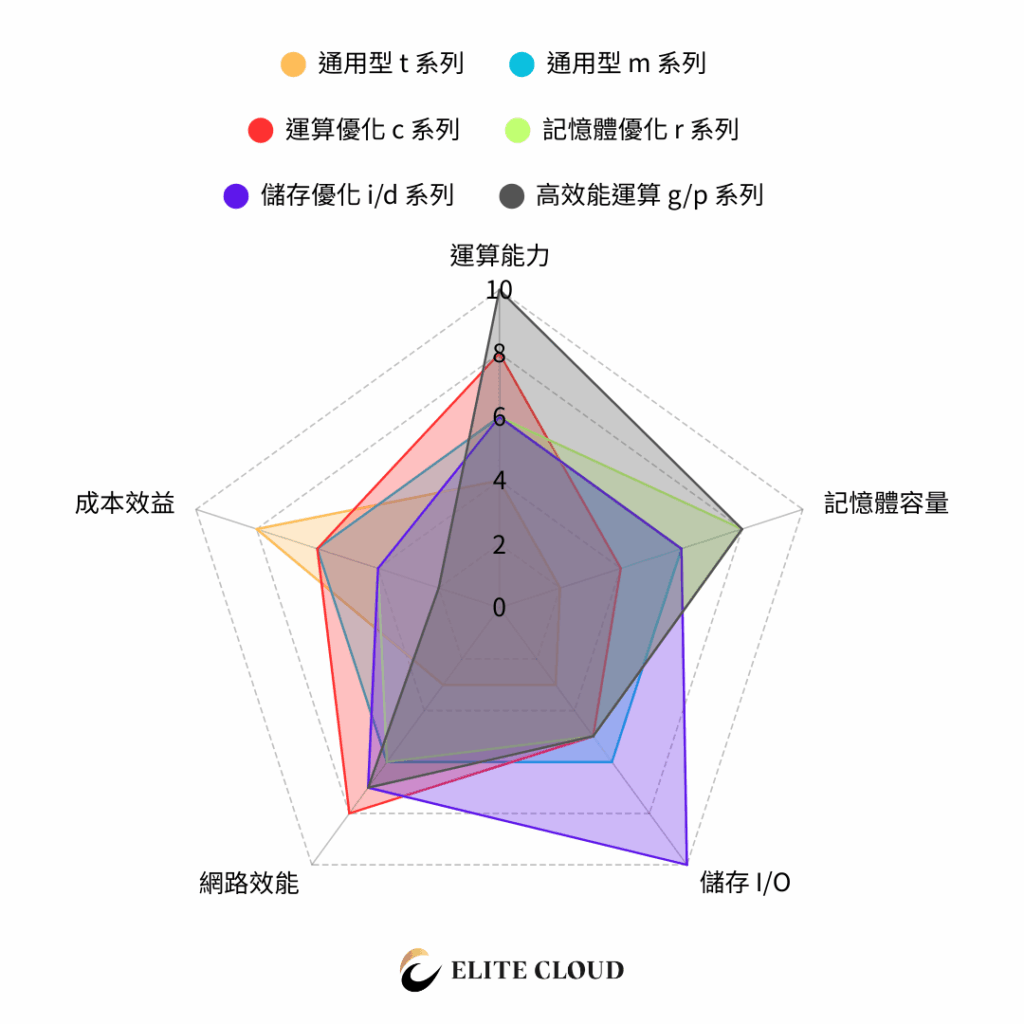
The EC2 instance family determines what each instance is designed for.
Different families target different workloads, so once you know their characteristics, it becomes much easier to narrow down your choices.
| Family | Purpose | Key Features | Typical Use Cases |
|---|---|---|---|
| t Series (Burstable) | Entry-level, low-cost | Uses CPU credit model for short bursts of performance | Test environments, microservices, low-traffic websites |
| m Series (General Purpose) | Balanced performance | CPU + memory balance; ideal for most workloads | Web servers, business apps, container workloads |
| c Series (Compute Optimized) | High compute performance | High vCPU-to-memory ratio | Batch processing, high-performance computing, game servers |
| r / x Series (Memory Optimized) | Memory-intensive workloads | More RAM per vCPU | Databases, caching, in-memory analytics |
| i / d Series (Storage Optimized) | High I/O performance | Local NVMe SSDs for high throughput | OLTP, transactional systems, NoSQL databases |
| g / p Series (GPU Accelerated) | Graphics & AI workloads | Dedicated GPU for ML, rendering, or video workloads | AI training, 3D rendering, visual computing |
How to choose:
- Start with your use case: Website → m series; Database → r series; AI / GPU → g or p series; Storage-heavy workloads → i or d series
- Then consider budget: Entry-level or short-term → t series; Long-running production → m, c, or r
- Finally, scale by size: Start small (e.g., large) and scale up (xlarge, 2xlarge) as needed.
Generation: Hardware and Performance Evolution
The number in the instance type (e.g., 5, 6, 7) represents its generation.
A higher number means newer hardware — usually with better performance, efficiency, and cost-to-performance ratio.
From AWS benchmarks and real-world testing, the performance or price/performance difference between generations is typically 15–40%. Examples:
- Graviton2 架構的 M6g:比起 M5 系列,在許多常見工作負載中可提供 高達 40% 的價格效能提升。
- Intel (M6i) – around 15% improvement over M5, with higher vCPU/memory ratio and stronger network bandwidth.
- Graviton3 (M7g / R7g) – roughly 25% faster than M6g, especially in compute and memory-intensive tasks.
Therefore, if your workload is CPU-intensive, involves high network throughput, or requires heavy I/O performance, choosing the latest or near-latest EC2 generation usually delivers real performance and cost benefits.
However, if you’re running small APIs, testing environments, or low-traffic services, older generations can still meet your needs — and help you save on budget without sacrificing stability.
Why the generation matters:
- Performance boost: newer processors, faster networking, better storage throughput
- Better cost efficiency: higher performance per dollar, lower TCO (Total Cost of Ownership)
- Regional support: older generations may be unavailable in new AWS Regions
How to choose:
- New projects: always start with the latest generation to ensure compatibility and future readiness
- Existing workloads: plan gradual migration to newer generations for better efficiency and cost savings
Attributes: Processor Type & Special Features
After the generation number, additional letters describe processor types or extra capabilities.
These attributes directly affect performance, cost, and workload suitability.
| Letter | Represents | Description | Examples |
|---|---|---|---|
| i | Intel | Uses Intel Xeon CPUs | m6i、c6i |
| a | AMD | AMD EPYC processors, typically more cost-effective | m6a、r6a |
| g | Graviton | AWS-built ARM processors with high efficiency | m6g、c7g |
| d | Local NVMe Storage | Instance store with SSDs for high IOPS | m6id、r6id |
| n | Enhanced Networking | Supports higher bandwidth / EFA for HPC | c7gn、r6dn |
| e | High Frequency CPU | Higher clock speed for single-threaded workloads | z1d |
| z | Ultra Memory | Extremely high memory configurations | u-、z1d |
Notice: These attributes can be combined. Example:
r6idn= memory optimized + Intel CPU + NVMe + local disk + enhanced networking.
How to choose:
- CPU architecture (i/a/g):
- Intel (i) = Intel → best compatibility
- AMD (a) = AMD → budget-friendly x86 option
- Graviton (g) = Graviton → great for new containerized workloads
- Functional attributes (d/n/e/z):
- d → local storage, ultra-fast but non-persistent
- n → high-bandwidth, ideal for HPC and distributed apps
- e → high single-core performance
- z → massive memory for SAP HANA or analytics workloads
Size: Scaling vCPU and Memory
The size (e.g., small, large, xlarge, 2xlarge) defines how much CPU and memory you get.
Think of it like clothing sizes — the same family and generation, just scaled up in power.
Common Size Comparison
- nano / micro / small → Entry-level or test workloads
- medium / large → Common starting point for web or API servers
- xlarge / 2xlarge / 4xlarge… → Scaled-up configurations, doubling CPU & RAM each tier
- metal → Bare metal – direct access to physical hardware, no virtualization
How to choose:
- Start small, scale smart: begin with the smallest that runs well, then upgrade if needed
- Avoid oversizing: large instances waste money if underutilized
- Use CloudWatch: monitor CPU, memory, and I/O — upgrade only when average utilization exceeds 70–80%
Still Not Sure Which EC2 Type to Choose? Let Elite Cloud Help
While AWS EC2 naming might look complex, once you understand the Family + Generation + Attribute + Size formula, choosing the right instance becomes simple and cost-effective.
如果你還在猶豫該選哪個 EC2 規格,或是覺得目前的雲端費用太高,勤英科技(Elite Cloud) 可以幫你找到最合適的解決方案。我們是 AWS 代理商,熟悉 EC2 規格與定價模式,能協助企業做出正確選型,同時規劃 成本優化,避免資源浪費。