If you have ever wondered whether you can just move an EC2 instance from one region to another, the short answer is no. AWS does not provide a direct move button. What we actually do in real life is recreate the instance in the target region using an image or snapshot of the original one.
In this article, I will walk you through the exact practical methods we use to transfer an EC2 instance to a different region, what gets transferred, what does not, and the mistakes you should avoid.
Can You Directly Move an EC2 Instance Between Regions?
No, you cannot directly move a running or stopped EC2 instance between regions. An EC2 instance is always tied to a specific region.
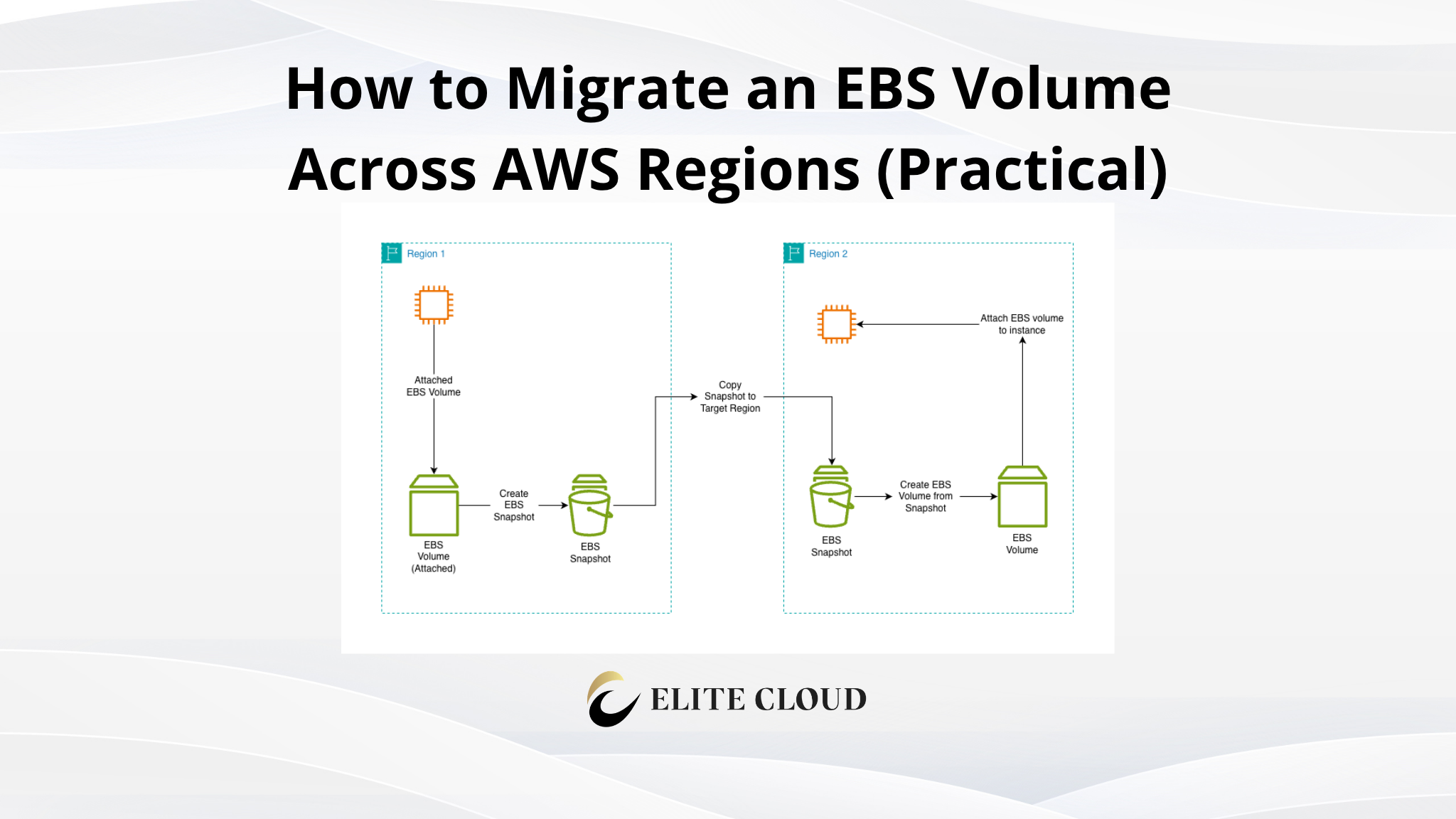
What we do instead is create a reusable copy of the instance, move that copy to another region, and then launch a new instance there. From a functional point of view, this feels like a transfer, but technically it is a rebuild.
Things to Know Before Transferring an EC2 Instance
Before jumping into the steps, you need to understand a few basics so nothing surprises you later.
An EC2 instance lives inside a region and an Availability Zone. When we move between regions, everything that depends on region-specific resources must be recreated.
The following things are transferred:
- Root and attached EBS volumes (data included)
- Installed software and configurations
- OS-level settings
The following things are not transferred:
- VPCs and subnets
- Security groups
- Key pairs
- Elastic IPs
- IAM roles (must be reattached)
Keeping this in mind saves a lot of confusion after launch.
Common Real-World Scenarios for Region Transfer
Most of the time, we transfer EC2 instances for one of these reasons:
- Reducing latency by moving closer to users
- Disaster recovery setup
- Compliance or data residency requirements
- Migrating workloads during region expansion
The steps are the same regardless of the reason.
Transfer EC2 Instance Using AMI (Recommended)
This is the cleanest and most commonly used method. I personally recommend this unless you have a very specific reason not to.
An AMI is a full image of your EC2 instance, including the root volume and attached EBS volumes. Once we create an AMI, we can copy it to any other region and launch a new instance from it.
Step-by-Step: Create an AMI from the Source EC2 Instance
Go to the EC2 console in the source region.
Select the instance you want to transfer. From the Actions menu, choose Image and templates, then click Create image.
Give the AMI a clear name. You can create the image while the instance is running, but for production systems, I prefer stopping the instance briefly to ensure data consistency.
Once created, wait until the AMI status becomes Available.
See the full guide here:
Copy the AMI to a Different Region
Now switch to the AMIs section in the EC2 console. Select the AMI you just created. From the Actions menu, choose Copy AMI.
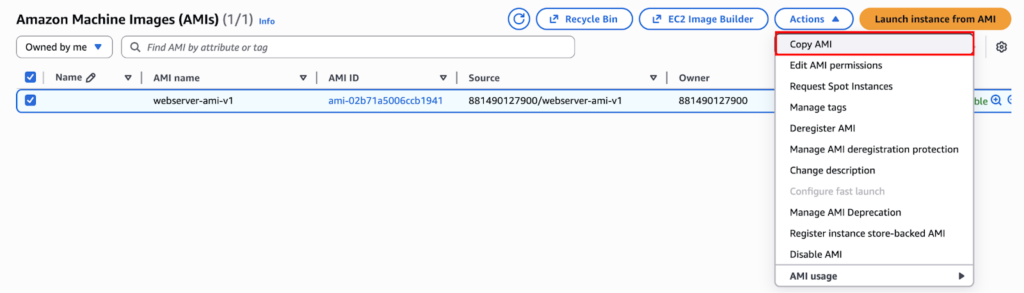
Select the destination region. You can also encrypt the AMI during the copy if needed.
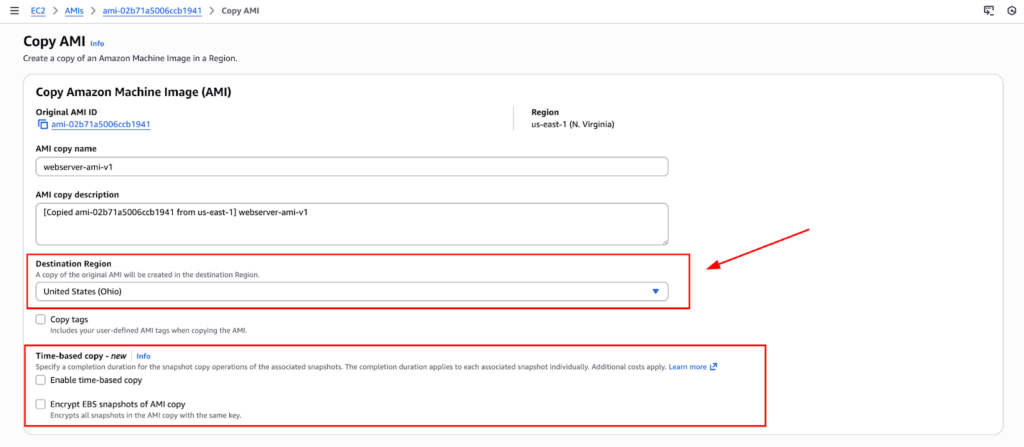
You can also add tags for the image and snapshot. Once you are done with your requirement, click on “Copy AMI”. Depending on the size of the volume, this may take a while.
When it finishes, the AMI will appear in the AMI section for the target region. The original instance was in N. Virginia.

Launch a New EC2 Instance from the Copied AMI
To launch an instance, switch the console to the target region. Go to AMIs, select the copied AMI, and click “Launch instance from AMI”.

Now you configure the instance just like any normal EC2 launch:
- Choose instance type
- Select VPC and subnet
- Attach or create security groups
- Choose a key pair
This is where many people get confused. You must manually select networking and access settings because these do not carry over from the source region.
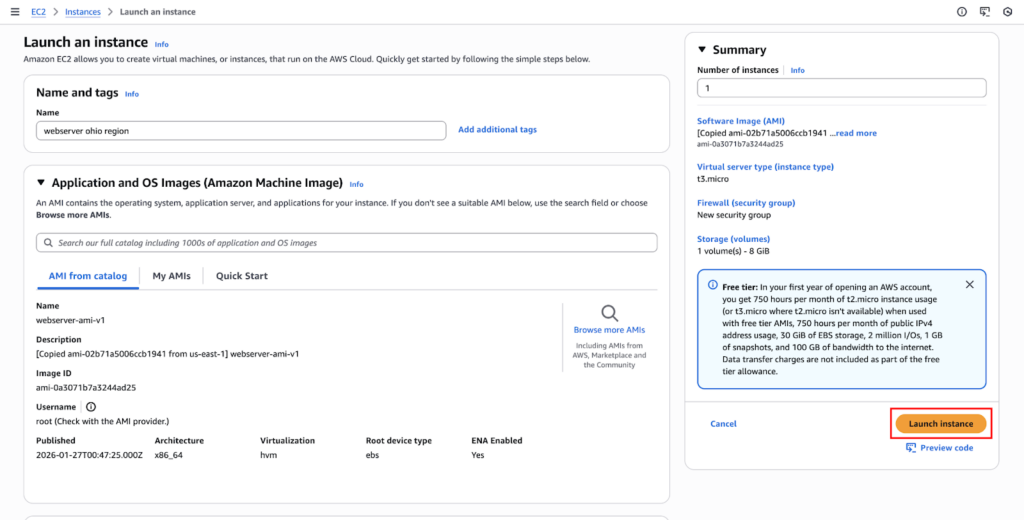
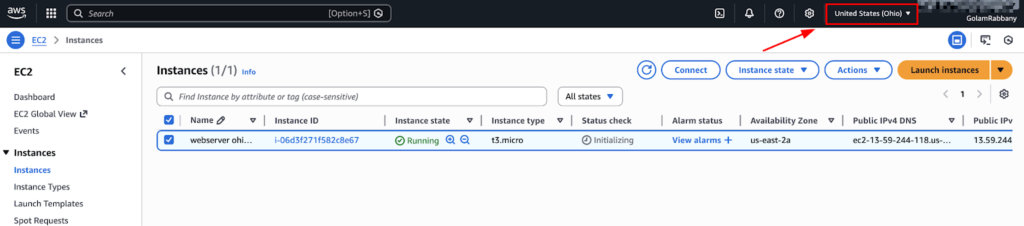
Launch the instance and wait until it is running. And you can see the instance has been successfully transferred from N. Virginia to Ohio.
Post-Launch Checks and Fixes
Once the instance is running, do not assume everything is perfect.
First, verify network access. Make sure the security group allows SSH or application traffic. Confirm route tables and internet gateways if the instance needs internet access.
Next, check access. If you used a new key pair, make sure you can connect successfully.
If the instance previously had an Elastic IP, allocate a new one in the target region and associate it. Elastic IPs are region-specific and cannot be moved.
Finally, verify your application. Check logs, services, and environment variables to ensure everything behaves as expected.
Cost Considerations During Region Transfer
During this process, you will incur some temporary costs.
AMI storage and snapshot storage are charged. Data transfer between regions is also charged.
Once the migration is complete and verified, delete any unused AMIs and snapshots to avoid unnecessary costs. If you have followed the article, remove the new EC2 instance, AMI, instance volume, and snapshot. Then, remove the AMI and snapshot of the first region.
Common Mistakes and How to Avoid Them
One common mistake is forgetting that security groups and key pairs are region-specific. Always recreate or reselect them in the target region.
Another mistake is launching into the wrong VPC or subnet, especially if you have multiple environments.
Finally, people often forget to update DNS records after migration. If your application relies on a domain name, ensure it points to the new public IP address or the load balancer.
Verification Checklist After Migration
Before calling the job done, I always check:
- Instance is reachable
- Application is running
- Logs show no errors
- Data is intact
- Monitoring and alarms are attached
If all of this looks good, the transfer is complete.
Final Thoughts
There is no magic button to move an EC2 instance between regions. What we actually do is rebuild it using AMIs or snapshots.
For most use cases, the AMI method is faster, safer, and easier to maintain. Snapshot-based transfer is useful when you need more flexibility.