Is Your AWS Bill Truly Transparent? Check These 5 Hidden Traps
When you receive an AWS invoice, can you view the full billing details directly inside your own AWS account, or are you forced to rely on a reseller’s PDF report?
If your billing access has been restricted, you may already be paying more than what you actually used.
This usually happens when a reseller intentionally hides billing visibility or fails to provide discounts, cost-saving recommendations, or transparent cost governance.
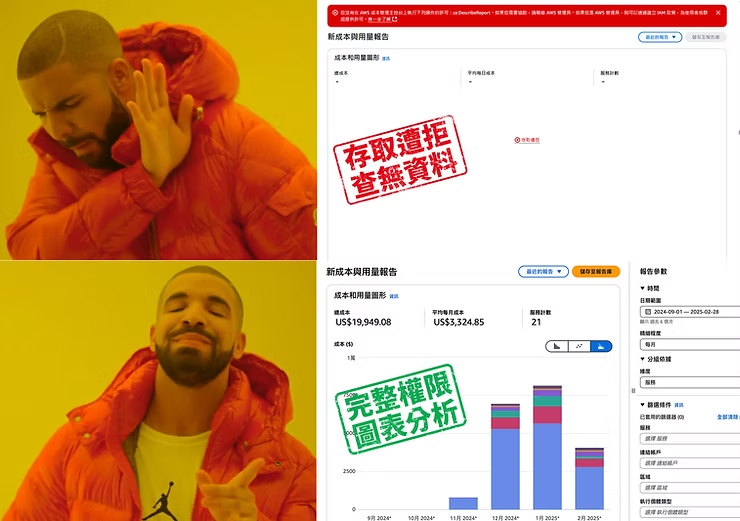
Common AWS Billing Traps
- No access to the official AWS billing console: Your reseller disables billing permissions, preventing you from viewing itemized charges.
- Charges for services you didn’t use: This could indicate incorrect billing or hidden markups.
- Missing cost breakdown: PDF reports provided by resellers often remove critical line-item details.
- Mismatched numbers between AWS official billing and reseller reports: If the numbers don’t align, you may be getting overcharged.
- Difficulty requesting refunds: Without access to the official AWS usage records, validating incorrect charges becomes nearly impossible.
📢 The root cause of all these issues? Your reseller has blocked your billing visibility.
3 Steps to Verify Whether Your AWS Billing Is Being Hidden
Step 1: Sign in to your AWS account
- Use your administrator account and log in to the AWS Management Console.
- In the search bar, type “Billing & Cost Management.”
Step 2: Check your billing visibility
- Go to Billing & Cost Management > → Click Bills
- ⚠ If you see “Access Denied,” your reseller has disabled your billing access.
💡 Important: Your AWS bill belongs to you, not your reseller.
If you cannot see your detailed charges, your cloud costs are already at risk.
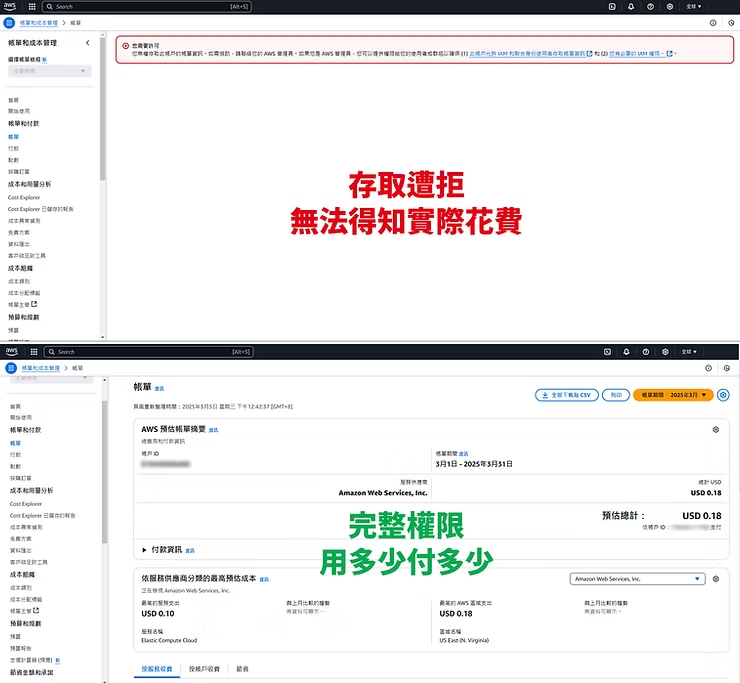
Step 3: Compare the official AWS console with your reseller’s bill
- Check if you have access to full usage breakdown: including Cost Explorer; Billing data export (Cost & Usage Report)
- If your reseller only provides a PDF invoice, your billing access is likely blocked.
- If you notice unexplained charges, hidden fees, or mismatched numbers, you may already be overpaying.
Elite Cloud vs. Other Resellers: AWS Billing Transparency Comparison
| Service Comparison | ✅ Elite Cloud | ❌ General Cloud Resellers |
| AWS Billing Visibility | Full access directly in your AWS account | Billing access restricted; only PDF reports available |
| Fee Breakdown | Transparent, itemized, and easy to verify | Missing details; possible hidden markups |
| Ability to Verify Costs | You can compare using official AWS data | No visibility into actual usage data |
| Hidden Fees | Zero hidden charges | Possible additional markups or undisclosed management fees |
| Cost Optimization | Offers discounts and optimization plans, help reduce AWS cost | Rarely proactive in helping you reduce costs |
📌 Read More: AWS & GCP Billing Mistakes You Should Avoid: How Taiwan Businesses Can Bypass the 20% Withholding Tax
📢 Don’t Let Resellers Overcharge You — Check Your AWS Bill Today
If you cannot see your AWS billing details directly inside the AWS console—or if your reseller only gives you PDFs—your cloud expenses may not be fully transparent.
Contact Elite Cloud today for a free billing transparency check, and ensure every dollar you spend is fully visible and optimized.